When setting up automated messages, you use two types of conditions: reservation conditions and message conditions.
- Reservation conditions determine if the entire automation schedule applies to a reservation.
- Message conditions apply to each individual message within that automation, determining if and when that specific message should be sent.
Read below to see the message conditions and how to combine them to define which event triggers a message in the automation.
How message conditions are applied
Guesty adds a message automation to a reservation at confirmation if the reservation meets the reservation conditions.
Once the automation is added, Guesty triggers each message independently based on its specific message conditions. If you set multiple conditions for a message, Guesty sends it at the scheduled time only if all conditions are met.
If the scheduled time arrives but the conditions aren't met, the message moves to a "waiting" status. It will send if the conditions are fulfilled later, or it will expire if they are never met.
|
For example: You set up a message with the following conditions:
How it works:
|
If the scheduled time of the message has already passed when the reservation is confirmed, the message will be sent immediately at confirmation.
The status of automated messages based on their conditions is reflected in the automated messages widget.
When a condition is considered met
When you use message conditions, the condition status in the automated messages widget might display as pending, even after the guest completes the required action. For most conditions, Guesty evaluates the status only at the scheduled execution time, not when the action occurs.
|
For example: A reservation is created on February 13, and the guest's check-in is on February 20. You set up an automated message with the "Guest App check-in form submitted" condition scheduled to send one day before check-in (February 19). How it works:
|
Review the evaluation time for conditions below:
| Condition type | Evaluation timing |
|---|---|
| Check-in form completed | At scheduled execution time (not before) |
| Agreement form completed | At scheduled execution time (not before) |
| Guest review submitted | At scheduled execution time |
| Available nights | At scheduled execution time |
| Reservation was fully paid | When reservation payment status changes |
Expiration rules
Messages expire under the following conditions:
- Messages related to check-out expire 7 days after their scheduled time
- Messages unrelated to check-out expire at check-out
Default message conditions
Send messages based on the confirmed number of guests.
|
For example: Let's say that your condition is relevant to 4 guests. | |
| Is | The message will be sent when the total number of guests is exactly 4 guests. |
| Is not | The message will be sent when the number of guests confirmed is any number except the specified one. |
| Is more than | The message will be sent when the total number of guests is higher than 4 guests (5 guests or more). |
| Is less than | The message will be sent when the total number of guests is lower than 4 guests (3 guests or fewer). |
Toggle on to send messages only to guests who have paid in full.
You can use this condition to send check-in instructions or door codes only after payment is confirmed.
Important:
Don't use this condition when sending check-in instructions for Airbnb reservations since they are only marked as fully paid 24 hours after check-in. You can use the "Channels and sources" reservation condition to exclude Airbnb in this case.
Toggle on to send messages only if the guest has completed their check-in form.
You can use this condition to release access information only after you receive the guest's details.
Note:
This condition supports the legacy Document manager. It also works for the Guest app if you only have one Guest app on your account. If you use multiple Guest apps, use the "Guest App check-in form submitted" condition.
Add messages to reservations based on the Guest app associated with the reservation.
If you use multiple Guest apps on your account, this ensures the automated message matches the specific Guest app.
Toggle on to send messages only if the guest signed their rental agreement.
You can use this condition to ensure legal requirements are met before sending arrival details.
Send messages based on the guest's estimated time of arrival (ETA). If no ETA exists, Guesty uses the default check-in time.
You can use this condition to offer early check-in services to guests arriving early or send late-night access instructions to guests arriving after hours.
Toggle on to send messages based on whether an ETA exists on the reservation.
You can use this condition to remind guests to provide their arrival time if they haven't done so yet.
Send messages based on the guest's estimated time of departure (ETD). If no ETD exists, Guesty uses the default check-out time.
You can use this condition to offer late check-out for a fee, or send specific instructions for early morning departures.
Toggle on to send a message based on whether an ETD exists.
You can use this condition to remind guests to provide their departure time if they haven't done so yet.
Send messages based on the guest's preferred language.
You can use this condition to create language-specific templates (e.g., a Spanish template with the condition "Preferred language is Spanish").
Important:
- Airbnb, Booking.com, and Vrbo: The guest’s preferred language is imported and saved in Guesty, and populates the preferred language field automatically.
- All other channels: The guest's preferred language field is not populated automatically; it must be filled out under guest details.
Learn more about setting a default preferred language for guests.
Send messages based on the guest's city of origin.
You can use this condition to remind locals of strict party policies or house rules.
Note:
This condition is only supported when the hometown is provided by the booking channel or if you add it manually in Guesty.
Toggle on to send messages if the guest has stayed at this property before.
You can use this condition to send a "welcome back" note or skip the basic instructions they already know.
Send messages based on the total amount the guest paid (in listing currency).
You can use this condition to offer VIP services or a special thank you to guests who pay more for their reservation to make sure they feel their money was well spent and encourage them to return.
Note:
This message condition applies only to Airbnb reservations.
Toggle on to send messages based on whether the auto review feature is active for this guest.
Note:
This message condition applies only to Airbnb and Booking.com reservations.
Toggle on to send messages based on whether the guest has already reviewed you. You can set a specific rating for the condition.
You can use this condition to remind guests to leave a review if they haven't yet, or thank guests who left a 5-star review.
An authorization hold is a temporary amount you can charge your guests to ensure they pay when payment is due. Send messages based on whether the charge failed or succeeded.
- An authorization hold fails if the reservation has at least one failed authorization hold attempt and no successful ones.
- An authorization hold succeeds if the reservation has at least one successful authorization hold attempt.
You can set up different messages for successful and failed authorization hold attempts to notify guests accordingly. Since a reservation can have multiple authorization holds, its status may change over time.
A security deposit is a temporary amount you can charge your guests to protect you against damages during their stay. Send a message at the scheduled event based on whether the charge failed or succeeded.
- A security deposit fails if the reservation has at least one failed security deposit attempt and no successful ones.
- A security deposit succeeds if the reservation has at least one successful security deposit attempt.
You can set up different messages for successful and failed security deposit attempts to notify guests accordingly. Since a reservation can have multiple security deposits, its status may change over time.
Send automated messages based on the success or failure of general reservation-related payments. This condition covers common payment scenarios beyond authorization holds and security deposits, allowing you to automatically notify guests about their payment status.
This condition applies to all payments processed through any payment processor. You can choose from three status options:
- Not successful (failed): The reservation has at least one failed general payment and no successful payments or payments awaiting authentication.
- Successful: The reservation has at least one successful general payment.
- Awaiting authentication: The reservation has at least one payment awaiting authentication.
You can set up different messages for each payment status to notify guests accordingly.
Note:
This premium feature is currently available to all accounts.
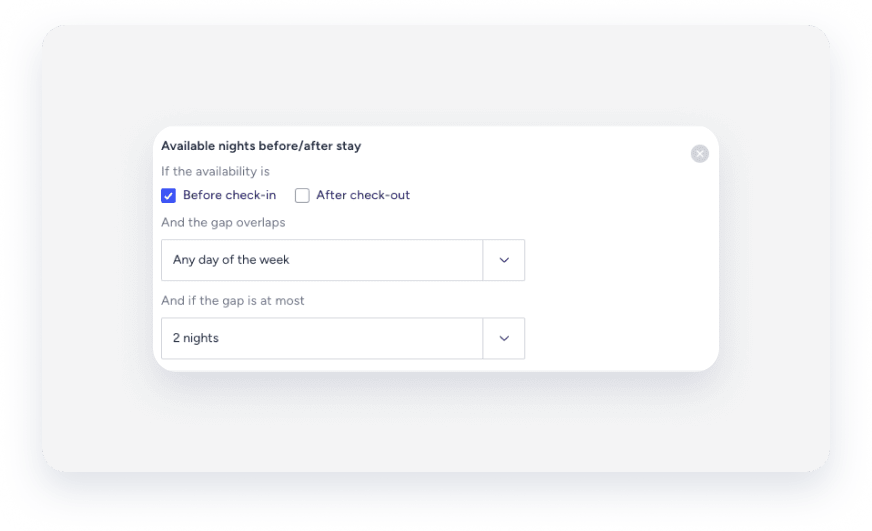
Send messages to reservations based on whether there are available nights before and/or after the guest’s stay. This helps you maximize occupancy and increase potential revenue.
Use this condition to offer guests an extra night at a discount if the property is vacant before their arrival or after their departure.
Important:
Manual calendar blocks are ignored when checking for available nights. If you manually block a date, Guesty still considers it available for this message condition.
You can customize this condition as follows:
- If availability is before check-in, after check-out, or both.
- If availability is on any day of the week, only weekdays, or only weekends.
- The maximum length of the gap between reservations.
|
For example: According to the condition below, the message will be sent only if:
|