The Guesty Inbox is your central hub for guest communication, helping your team stay aligned and respond faster.
To access the Inbox, in the side navigation menu, click  Inbox. You can also access the Guesty Inbox from the
  Multi-calendar. Locate the listing and click the relevant reservation. In the right pane, click
  . Select Go to Inbox to open the thread with the relevant guest so that you can continue the communication with them.
Review the sections below to streamline your communications.
Note:
Guesty only provides SMS and WhatsApp message logs from the past 14 days. Logs outside this timeframe cannot be retrieved or reviewed.
Navigate the Inbox
The Inbox is divided into four sections. Review what you can do in each section below.
Inboxes sidebar
In the left sidebar, under "Inboxes", you can choose which inbox to view from the following options:
- Guests inbox
- Archived conversations
- Snoozed conversations
You can also click Manage to configure additional integrations, including WhatsApp Business, ReplyAI, and AutoReply.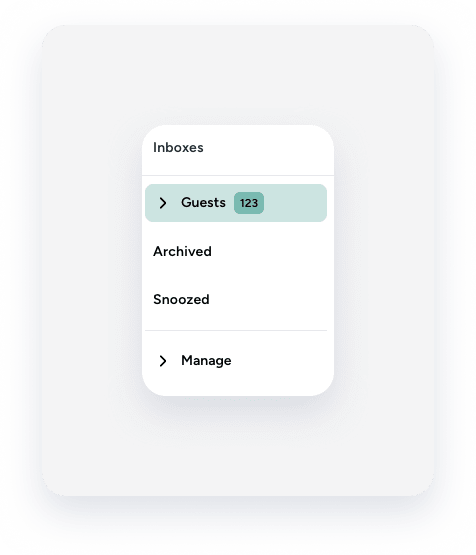
Conversations feed
Under "All," you can view, search, or filter communications related to the inbox selected in the "Inboxes" section.
For each conversation, you can see the property name, guest name, reservation status, dates, number of nights, and the latest message in the thread along with the date it was sent.
Message thread
To the right of the conversations feed, you can view the selected message thread and send a message, mark as read or unread, snooze, archive, or translate messages.
Inbox widgets
On the right side of the page, you'll find the Inbox widgets. Use them to view relevant information such as reservation details, operations details, property data, guest profile, and automated messages.
