If your account disconnects from Vrbo you will receive an email notification. If you see an "Action required" banner when you open your Vrbo distribution page in Guesty, your Vrbo account is disconnected and the connected listings are suspended.
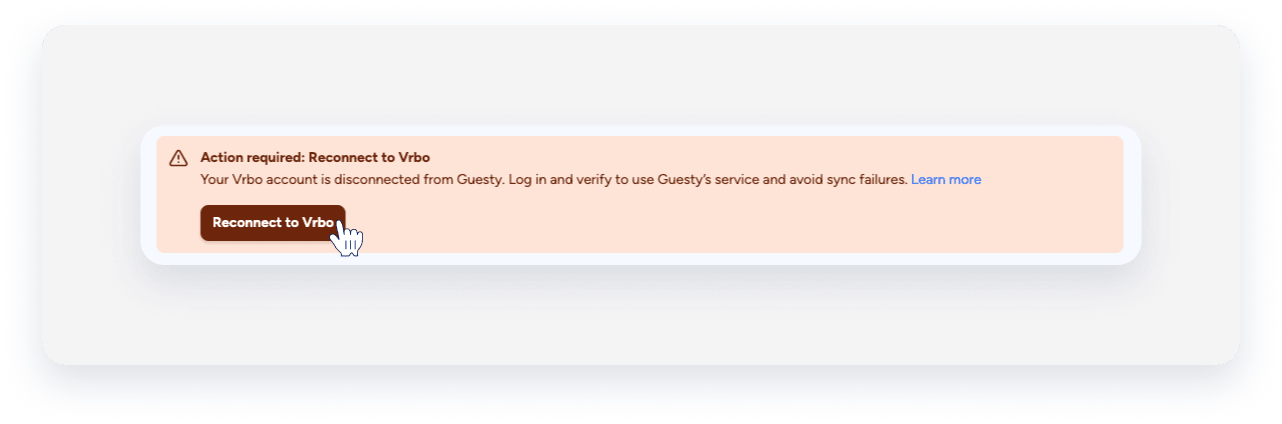
A disconnected account can occur for several reasons, including a recent password change, additional verification requested by Vrbo, or an expired Guesty Lite trial or subscription.
Before you begin
To identify and resolve the cause of the disconnection:
- Password changes: Check if you’ve recently changed your Vrbo password.
- Verification request: Check if Vrbo has requested additional verification, such as an SMS confirmation.
- Subscription status: Check if your subscription has expired.
Note:
If you hid your listings on Vrbo during a disconnection, hidden listings block the reconnection process. Sign in to your Vrbo account and unhide your listings before retrying the connection in Guesty.
Reconnect after password change or verification request
If you receive a notification that Guesty can’t connect to Vrbo, follow these steps to reconnect:
Step by step:
- Sign in to your Guesty account.
- In the side navigation menu, click
 Channels to open the dropdown menu.
 - Select Vrbo.
- Click Connect to Vrbo.
- In the pop-up, enter your Vrbo email and password, followed by the SMS verification code.
Reconnect after trial or subscription expiration
If your account becomes inactive due to an expired trial or subscription, the Vrbo integration may disconnect. After reactivating your Guesty account, check your Vrbo mappings:
- If your connected listings are still visible, no further action is required.
- If your connected listings are missing, restart the Vrbo integration.
Restart the Vrbo integration
Step by step:
- Check your email. Look for any Vrbo notifications about account disconnection or verification requests.
- Sign in to your Guesty account. Follow any prompts to re-enter your Vrbo credentials.
- Reconnect your account: In the Vrbo section, click Reconnect, enter your Vrbo email and password, and then enter the SMS verification code.
Review your reservations
Vrbo does not send reservation details to Guesty while your account is disconnected. Reservations received on Vrbo during disconnection don't sync automatically after you reconnect.
- Add missing reservation: Review your Vrbo account for any missing reservations and enter them manually into Guesty Lite to keep your calendar and guest communication up to date.
- Check for double bookings: Compare your reservation lists between Vrbo and Guesty after a reconnection to avoid double bookings or missed check-ins.
Use Guesty mobile app after Vrbo disconnection
The Guesty mobile app may show a blank screen for your Vrbo integration during or after a disconnection incident. Always check your Vrbo connection status in a desktop or laptop browser before taking further action.
- If your Vrbo account is already connected: No reconnection is required. The blank screen in the mobile app is a known display quirk related to the incident, not a sign of a problem. Check from a desktop or laptop browser if the listings display correctly.
- If your Vrbo account is genuinely disconnected: Reconnecting via the Guesty mobile app is not possible during the failure mode. Follow the desktop browser workaround below to restore your connection.
Step by step:
- Uninstall the Guesty mobile app.
- Open a browser on your mobile device.
- Switch the browser to the desktop mode.
-
Safari: Tap
 to open the page settings. Tap
  and choose Request desktop website.
 -
Chrome: Tap and choose Desktop site.
-
Safari: Tap
- Sign in to your Guesty account.
- Complete the Vrbo reconnection process from the browser.
Understand the integration expiration
Your integration process may expire depending on how long your account remains inactive or frozen:
- 12-15 days of inactivity: Vrbo authorization expires, and Guesty will request you to reauthorize.
- Listings inactive or paused during frozen status: Vrbo integration listings may be suspended.
- 30+ days of inactivity: The integration may fully disconnect.
See our troubleshooting article for reservation issues.
Contact us if the reconnection process fails.