3D Secure (3DS) technology adds an extra layer of security for online credit and debit card transactions. This article explains how Guesty supports 3DS to help you manage secure payments and reduce chargebacks.
Understanding 3DS support in Guesty
If you use Stripe to handle payments, 3DS triggers based on Stripe's specific requirements.
Card validation and tokenization
Some transactions processed on a card with 3DS verification require the guest to validate the transaction manually. Guesty runs card validation and tokenization by attempting a $0.00 charge.
When Stripe triggers a 3DS authentication, the system automatically sends an authentication message to the guest. The amount displayed during this process is 0.00 rather than the total reservation amount.
Note:
The system sends these authentication messages automatically. They are separate from Guesty's automated messages feature and you can’t change or disable them.
Handling declined authentications
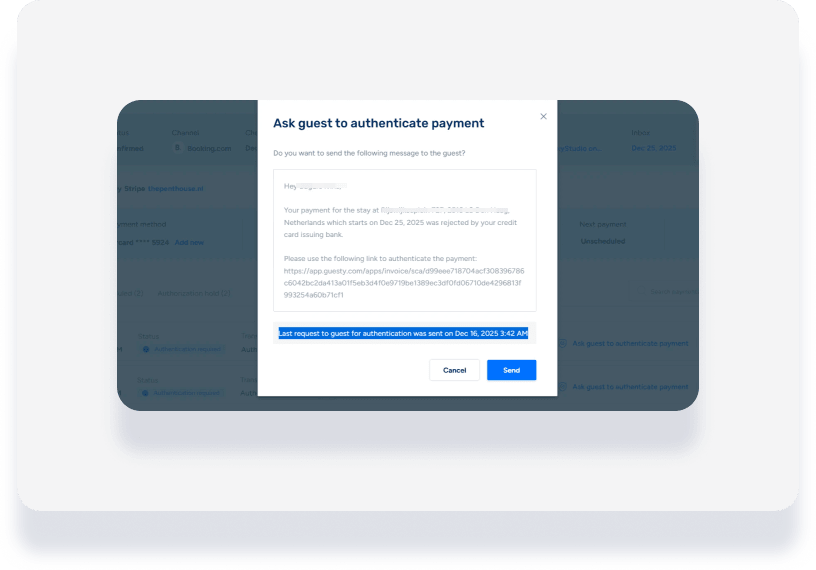
If a guest's 3DS authentication is declined or not completed, you can manually intervene to secure the payment.
Resending authentication requests
Check the reservation or payment details to monitor the status of the authentication. If the initial attempt fails, you can prompt the guest to try again.
Step by step:
- Sign in to your Guesty account.
- In the side navigation menu, click
 Reservation report.
 - Select the relevant reservation.
- In the submenu, click Payments.
Click Ask guest to authenticate payment to resend the request or follow up with the guest.