Guesty allows you to collect payments in various ways, depending on the booking channel and your preferences. This article explains the different payment collection types, how to manage them for your channels, and how to update payment settings for Vrbo.
Understand payment collection types
How payments are collected determines the merchant of record—the entity that processes payments and taxes, ensures compliance, and issues refunds or chargebacks. If the channel collects the payment, it is the merchant of record.
Hotel collect: You are responsible for charging the guest. You collect credit card details and use payment automations or process payments manually. You can also accept cash or use an external processor and record the transaction in Guesty.
Channel collect: The booking channel handles the payment and sends you payouts directly, usually via bank transfer.
Virtual Credit Cards (VCCs): The booking channel collects the payment from the guest and sends the funds to you via a temporary, digital card to protect the guest's personal details.
Working with VCCs
Virtual Credit Cards (VCCs) are secure payment methods provided by booking channels. VCC details appear on the reservation page like any other credit card.
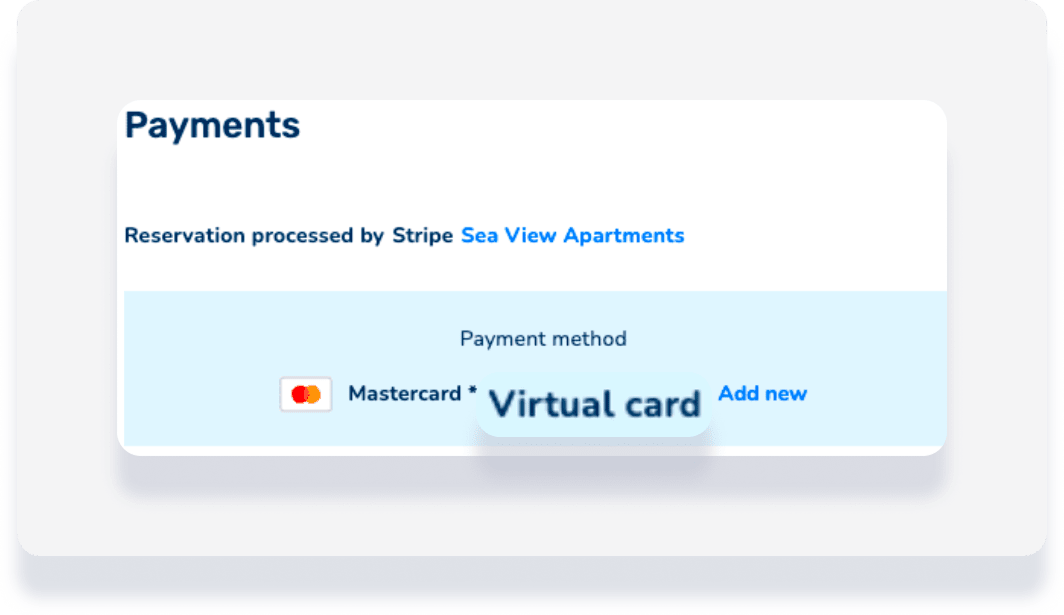
Each VCC has a specific activation and expiration date. The card can only be charged between these dates. Charging a VCC before it activates, after it expires, or for more than the loaded amount results in a failed payment.
For Booking.com and Expedia Connect, Guesty automatically charges the exact amount provided by the channel and waits until the activation date to start the charge.
Follow the steps below to manage VCCs effectively:
Use payment automations: Guesty automatically charges the VCC on or after the activation date for the exact amount provided by the channel.
Manual charges: If you prefer to charge manually, process the payment at least 24 hours after check-in.
Authorization holds: VCCs can't be used for authorization holds.
Some channels offer multiple payment collection options.
| Booking Channel | Hotel Collect | Channel collect | VCC |
|---|---|---|---|
| Airbnb | ✓ | ||
| Booking.com | ✓ | ✓ | ✓ |
| Booking Website | ✓ | ||
| Vrbo | ✓ |
Booking.com
Collect your Booking.com reservation payments through Guesty or use one of Booking.com's payment solutions. With either option, the reservation's total amount and payment breakdown in Guesty are based on data from Booking.com.
Booking.com offers several payment services based on your eligibility and location:
Payments by Booking.com: Collection via bank transfer.
Online payments: Collection via Virtual Credit Card (VCC).
Stripe facilitated bank transfers: Available for users in the US and Canada.
Booking.com charges a commission for these services and requires account approval. Check your eligibility and sign up via the finance page in your Booking.com Extranet.
When using this option, keep the following in mind:
Reservation payments, including security deposits and authorization holds, aren't collected or synced to Guesty.
Guest credit card details are not imported into Guesty.
While the payment collected by Booking.com syncs to Guesty, you must confirm it for the reservation to be marked as paid.
Bank transfer
Booking.com charges the guest's credit card for the accommodation fare, cleaning fees, and taxes. Any additional fees added via the Extranet are also collected.
You receive payouts via bank transfer daily, weekly, or monthly, depending on your setup.
Gross payout: You receive the total reservation amount. Booking.com then issues an invoice for the commission and processing fees.
Net payout: You receive the total reservation amount minus the commission and processing fees.
Processing fees typically range from 1.1% to 3.1% of the total payout. If you notice a discrepancy between a Guesty invoice and a Booking.com invoice, it is likely due to your payout method settings.
Pilot users: Payments collected by Booking.com are automatically marked as paid once Booking.com transfers the funds.
Virtual Credit Card (VCC)
Booking.com issues a temporary Mastercard (VCC) for each booking. Each card is unique and only becomes chargeable starting on the check-in date. You can view VCC details on the Booking.com Extranet.
Booking.com collects the accommodation fare, cleaning fees, and taxes. Because the VCC only contains the exact amount loaded by the channel, it will have a zero balance after the charge. To collect any additional fees after charging the VCC, you must obtain the guest's personal credit card details.
If you don't use Payments by Booking.com, you are responsible for collecting payments from guests. You can use a supported payment processor in Guesty or process charges manually.
Using a supported processor: Guest credit card details are imported into Guesty based on your Extranet settings. You can charge security deposits, additional fees, or authorization holds directly through Guesty.
Manual collection: If you don't use a supported payment processor, you must retrieve the guest's credit card details from the Booking.com Extranet and charge them independently. You must then manually record the payment in Guesty to keep your records accurate.
Vrbo
Vrbo users with a limited sync connection type, payment is collected in Vrbo.
Vro users with a full sync connection type, follow the instructions below.
Vrbo offers flexible payment options, though users in the Asia-Pacific (APAC) region must use Stripe.
Guests enter credit card details at booking, and Guesty collects payment via your connected processor and payment automation rules.
Includes cash, check, or debit.
If you select at least one of these options, guests aren't required to enter payment details at booking.
Guests are informed of your offered payment methods, and Guesty automatically records the payment based on your listing's automation rules.
Note: You must contact the guest directly to retrieve their payment details and collect the funds outside of Guesty.
If you select both, guests choose their preferred method at booking. Their experience will follow the rules of the specific method they select.
Process payments via Guesty
To collect guest payments through Guesty, connect a Stripe payment processor account. This option allows you to approve reservations automatically. Use payment automations to charge guests or collect payments manually.
Process payments outside of Guesty
Collect guest payments via bank transfer, cash, or other methods outside of Guesty. Send your guests payment instructions and track each payment individually.
We recommend recording these payments in Guesty by marking reservations as "paid manually" in the reservation page financial section. If you don't record them, reservations remain "unpaid" in Guesty reports.
Note:
If you manage payments outside of Guesty, reservations are created as "Requests to book" and payment automations aren’t available.
